Who can modify a company’s primary phone number?
Company administrators have access to the first phone number of their company and can modify it directly in the Workways app.
⚠️ This number is the one used when someone calls your company via the intercom at the main entrance.
What format should the number use?
The number must be in local format, starting with 0 and without spaces.
Example for Belgium: 02XXXXXXX
Where can it be modified?
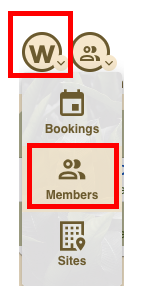
Go to app.workways.com, then click the W menu and select Members.
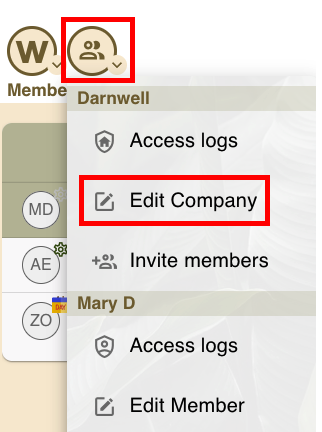
In Members, open the actions menu and click Edit Company.
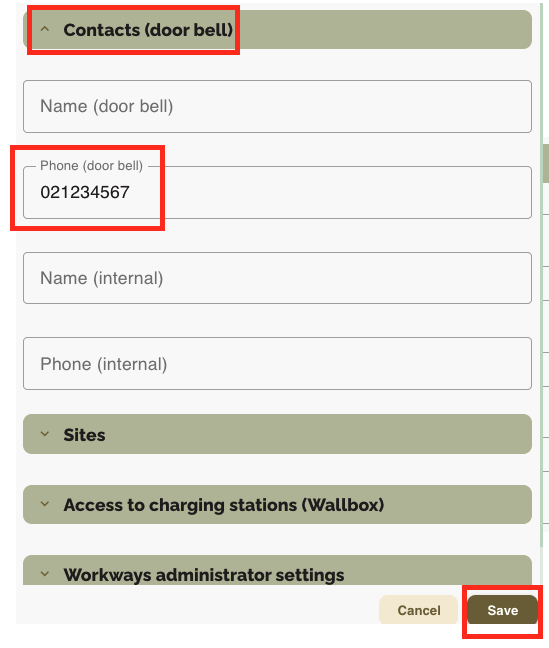
Then, go to Contacts (door bell) and enter your phone number in the field Phone (door bell), then click Save.
Can the client see or modify the name associated with a number?
No, the client does not have access to the name associated with the number.
If this field is empty, the name displayed will be the company name.
Is it possible to change the label of a number or add another number?
Any change to the label or addition of another number must be approved by the Workways Spaces Control team, which is the only allowed to make these changes.