
Facial recognition allows you to access your building quickly and securely – no access card is required at the building entrance. Once activated, your profile photo is used to identify you at compatible entrance devices
Please note: Enabling facial recognition as an access method may be subject to additional fees.
Before you start
The racial recognition option is only available if:
- Your company has enabled facial recognition
- Your company must request activation via the Workways Help Center.
- You have a profile photo uploaded to your account.
- You have a validated access card (not starting with ADDxxxx).
How to activate facial recognition
- Go to Manage accesses in your account.
- Click Use facial recognition.
- On first use, you will see a consent message (in line with data protection regulations such as GDPR).
- Click Use my profile photo for facial recognition.
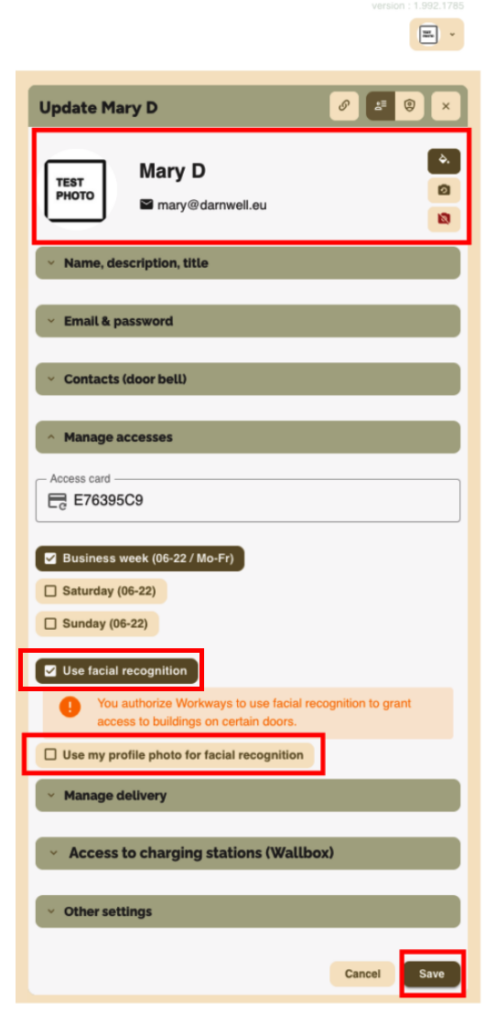
Photo verification
The system will automatically check whether your photo meets the required standards.

✅ If your photo is approved
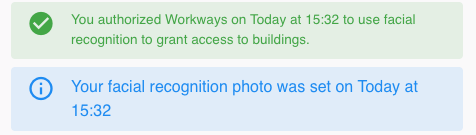
You are all set! You can now use facial recognition to access the building.
⚠️ If your photo is not approved
You may receive a warning or an error if:
- There are multiple faces in the photo
- Your face is only partially visible
- Your face appears too small
- The background is not plain
- You are not facing the camera directly

In this case, please upload a new profile photo that meets the requirements and try again.